Lesson 09: Crypto Wallets
Embark on your journey to building production grade apps.
Last lesson, you had to create a GitHub account to get your app online. That account is how GitHub knows who you are — it lets you own repos, push code, and build a history of your work. But remember, GitHub owns it. If they wanted to, they could ban you.
The blockchain works the same way, except you don't sign up with an email and password. Instead, you create a wallet. A wallet is how the blockchain knows who you are. It's how you own things, send and receive tokens, and interact with apps. No company creates your account. No one can delete it. No one can ban you. You generate it yourself, and only you control it.
What is a crypto wallet?
A crypto wallet is software that manages your blockchain accounts. It stores your credentials, signs transactions on your behalf, and connects you to decentralized applications. Think of it as the interface between you and the blockchain.
You probably already have one mental model for this: a browser. A browser doesn't contain the internet. It gives you access to it. A crypto wallet doesn't contain your tokens. It gives you access to your accounts on the blockchain, where your tokens actually live.
When you open a wallet for the first time, it generates an account. An account is made up of two things: an address and a private key.
What does a crypto wallet do?
Addresses
Your address is your identity on the blockchain. It is a string of text generated using cryptography, and it is completely safe to share publicly. When someone sends you tokens, they send them to your address. When you interact with an application, the application sees your address.
An address looks like this: 0x71C7656EC7ab88b098defB751B7401B5f6d8976F
Every account has exactly one address, and that address is unique to you.
Is it safe to share your address publicly?
Private Keys
Your private key is the counterpart to your address. If your address is your username, your private key is your password.
A private key looks like this: E9873D79C6D87DC0FB6A5778633389F4453213303DA61F20BD67FC233AA33262
Anyone who has your private key can make transactions from your account. There is no recovery process. There is no customer support. Blockchains are decentralized, which means there is no authority that can reverse a transaction or reset your credentials. If you lose your private key, you lose your account. If someone steals it, your funds are gone.
Never share your private key with anyone.
For developers: you will use your private key in your codebase to deploy smart contracts and send transactions. Use a dedicated development wallet with no real funds. Beginner developers regularly lose money by accidentally pushing private keys to public repositories.
What happens if someone gets your private key?
Seed Phrases
Your wallet can manage multiple accounts. Each account has its own address and private key. But the wallet itself has a master credential: the seed phrase.
A seed phrase is a sequence of 12 or 24 words generated when you first create your wallet. It looks like this:
dove lumber quote board young robust kit invite plastic regular skull history
The seed phrase generates all of your accounts. If you lose access to your wallet, you can restore every account from the seed phrase alone. If someone gets your seed phrase, they get access to every account in your wallet.
The seed phrase is your most sensitive credential. Store it offline. Do not screenshot it. Do not paste it into a website. No legitimate application will ever ask you for it.
What does a seed phrase do?
How should you store your seed phrase?
Setting Up Your Wallet
Since Monad is EVM-compatible, any EVM wallet works. The most popular options:
Download one, create a new wallet, and write down your seed phrase. Then create a second account inside that wallet dedicated to development. Use this development account throughout the course. Keep it separate from any account that holds real funds.
Important: Throughout this course, whenever we ask you to include wallet details or private keys, use your development account only. Never use an account with real funds for development.
Can you use MetaMask with Monad?
Connect to Monad
Your wallet works on Ethereum by default. To use it on Monad, you need to add Monad as a network. The easiest way is through ChainList — a trusted directory of EVM networks.
Testnet (use this for building)
Go to chainlist.org, search for "Monad", and check the Include Testnets box at the top — Monad Testnet only shows up when that's on. Connect your wallet and click Add to Metamask on the Monad Testnet card.
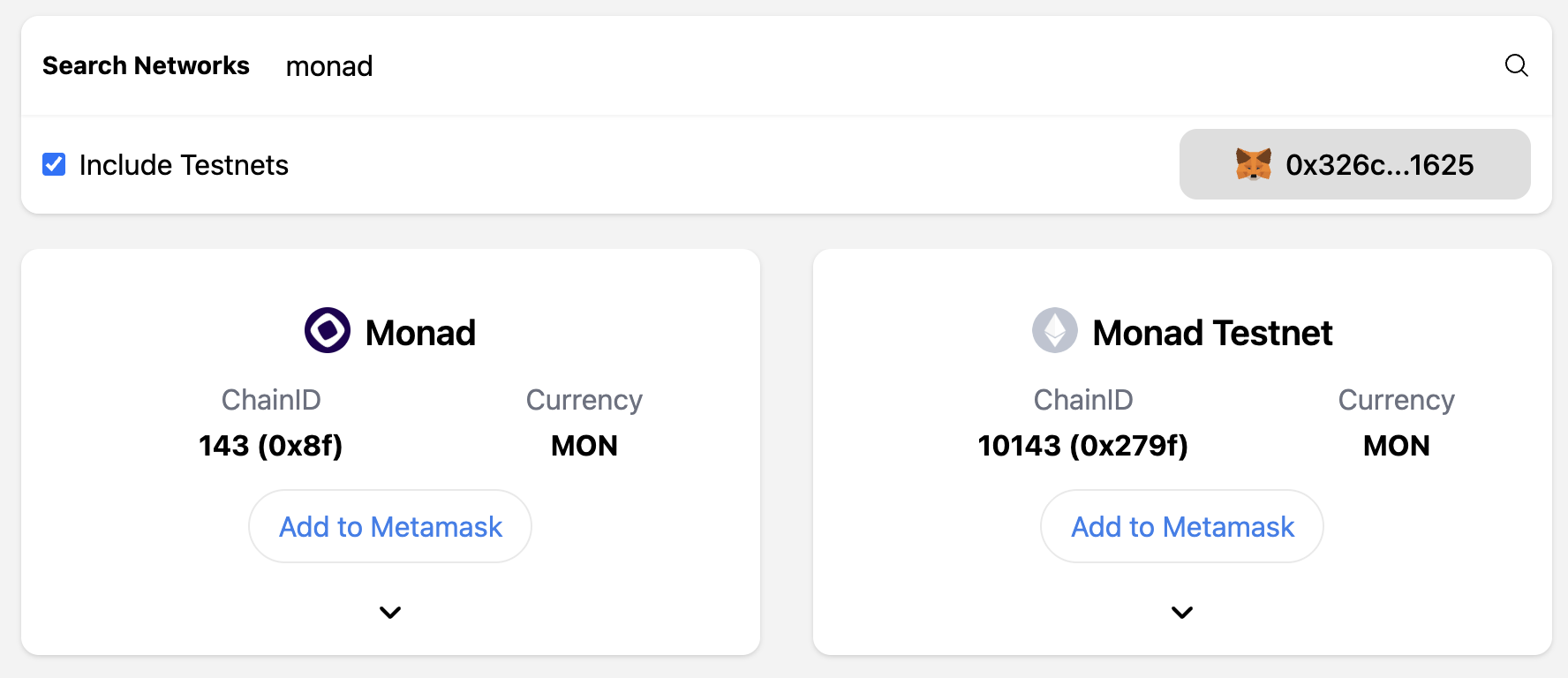
Or add it manually:
- Network Name: Monad Testnet
- Chain ID: 10143
- Currency Symbol: MON
- RPC URL: https://testnet-rpc.monad.xyz
- Block Explorer: https://testnet.monadscan.com
Mainnet
Go to chainlist.org, search for "Monad", connect your wallet, and click "Add to MetaMask."
Or add it manually:
- Network Name: Monad Mainnet
- Chain ID: 143
- Currency Symbol: MON
- RPC URL: https://rpc.monad.xyz
- Block Explorer: https://monadscan.com
For this course, use testnet. Testnet MON is free from the faucet and has no real value — perfect for learning and building without risking anything.
Get Testnet MON
Once you've added the Monad testnet to your wallet, open the Build Anything faucet, paste your wallet address, and request testnet MON. You'll need it to pay for transactions when you start deploying apps.
0/6 correct
0% — get all correct to complete