Lesson 10: Build Your First Decentralized App
Embark on your journey to building production grade apps.
You've built apps and shipped them to the internet. Now you're going to ship to the blockchain — something that no one can shut down, no one can censor, and no one controls except the code itself.
You've built apps and shipped them to the internet. But your code is still running on a server that someone owns. Vercel can go down. GitHub can ban your account. The company can change their pricing.
A decentralized app backend is different. Once you deploy it to the blockchain, it's there forever. No company controls it. No one can edit it. No one can take it down. It runs exactly as written, every time, for anyone.
You already know how to ship to the internet. Now you're going to ship to the blockchain.
And you're going to vibecode the whole thing.
Before You Start: A Word on Smart Contract Security
This lesson is introductory. The contract you're building stores a message on the blockchain. It handles no real money, no user funds, nothing of financial value.
That matters, because smart contracts that do handle money are a different story entirely.
AI agents are significantly better at writing UI code than smart contract code. The training data for Solidity is smaller, the logic is more specialized, and mistakes are harder to detect. Unlike a web app where a bug might break a button, a bug in a smart contract that handles funds can result in permanent, irreversible financial loss. There is no undo. There is no customer support. Once deployed, it's done.
The security team at Monad has flagged this clearly: vibe-coding smart contracts is risky, especially for anyone without smart contract experience. The advice from experienced engineers:
- Keep contracts small and simple. The more complex the logic, the more surface area for errors.
- Use audited libraries. Don't reinvent what already exists. OpenZeppelin is the standard.
- Never vibe-code a contract that handles real funds without a professional audit.
- Test on testnet first, always. Never deploy directly to mainnet.
For this lesson, you're safe. The MessageBoard contract stores a string. It moves no money. It's the equivalent of a "Hello World" for smart contracts, which is exactly the right place to start.
In the junior course, we'll go deeper on smart contract security, testing, and auditing. For now: build, learn, and stay on testnet.
What is a Decentralized App Backend?
A decentralized app backend is a program that runs on the blockchain instead of a server. Once it's deployed, no one can change it or take it down. It runs exactly as written, every time, for anyone.
Think of a vending machine. You put in money, press a button, and the machine gives you a snack. No cashier. No negotiation. The rules are built in and they execute automatically. A decentralized app backend works the same way.
Who controls a decentralized app backend after it's deployed?
What is Solidity?
Apps on Monad are powered by code written in a language called Solidity. It's the most widely used language for writing decentralized app backends, and it's what runs on the EVM — the same standard Monad uses.
You don't need to become fluent in Solidity to complete this lesson — your AI agent handles the writing. But understanding the basics will help you read what the agent produces and catch mistakes. If you want to go deeper, Solidity by Example is the best place to start.
Do you need to learn Solidity to vibecode a decentralized app backend?
Setting Up
[SANDBOX — RECOMMENDED]
You're probably still in Replit from the previous lesson with your list app open. Start a new project for this dapp:
- Click the project name dropdown in the top bar of the preview (next to the Canvas button).
- Click Create something new (it says "Build with Agent" underneath).
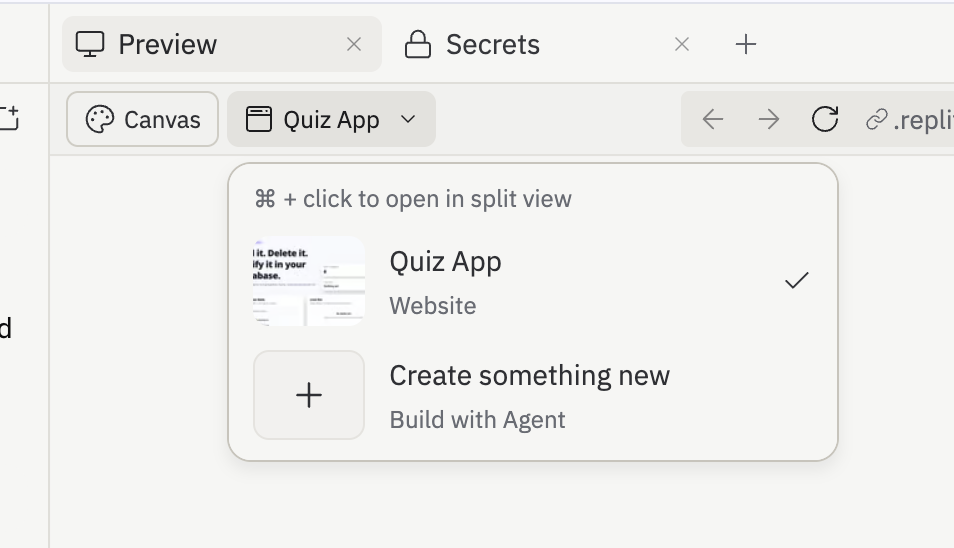
That opens a fresh prompt screen where you'll describe your new project in Step 1.
Step 1: Build the Frontend
Before you write any onchain code, build a frontend for users to interact with. Tell your agent:
> Create a new React app with a clean, simple UI for a message board.
  It should have:
  - A header with the app title "Message Board"
  - A section that displays a placeholder message (e.g. "Loading...")
  - A text input and an "Update Message" button
  - A "Connect Wallet" button in the top right corner

  You can set up wagmi + RainbowKit so the Connect Wallet button
  opens a real wallet-connection modal (configured for Monad testnet,
  Chain ID: 10143, RPC: https://testnet-rpc.monad.xyz).

  But the Update Message button must NOT be wired up to anything
  yet — no local React state, no handlers that change the displayed
  message, no fake updates. Keep it disabled or a no-op. We'll wire
  it to an on-chain contract in a later step, and the displayed
  message must only ever come from the contract.
Once the agent finishes, a live preview of your app opens automatically. You should see a basic page with the header, message section, input, and buttons. The buttons won't do anything yet. That's fine.
Your Wallet
You've got a frontend running. To deploy the contract in the next step you'll need a wallet connected to the Monad testnet. We're using testnet throughout this lesson, not mainnet. Testnet MON is free and has no real value.
Important: Use your development wallet, not your main wallet. You'll be feeding the private key into your agent's environment. Never use a wallet with real funds for development.
Get Your Private Key
You'll need your wallet's private key to deploy your contract. Here's how to find it in MetaMask:
- Open MetaMask and make sure you're on your development account
- Click the three dots next to your account name
- Select Account Details
- Click Show private key
- Enter your MetaMask password
- Copy the key
This is the most important security step in this lesson. Read this before continuing.
Your private key gives full control over your wallet. Anyone who has it can take everything in it. That includes AI agents.
Storing your private key in a
.envfile on your machine is not safe enough. The agent runs on the same machine and can read that file — especially if it gets prompt injected. If a malicious instruction tells the agent to read your.envfile and send its contents somewhere, it will.The rule is simple: the agent must never be able to see your private key. Follow the instructions below for your path.
Replit has a built-in Secrets manager. Secrets are stored encrypted and injected as environment variables at runtime. The agent cannot read them from the file system.
- In your Repl, click the Secrets tab in the left sidebar (lock icon)
- Click New Secret
- Set the key to
PRIVATE_KEYand paste your private key as the value - Click Add Secret
Your contract deployment code will be able to access it via process.env.PRIVATE_KEY, but the agent cannot see it in any file.
Get Testnet MON
Deploying a contract costs a small amount of gas. Without it, deployment will fail.
- Open the Build Anything faucet
- Paste your wallet address
- Request testnet MON
You can check your balance in MetaMask or by searching your wallet address on the Monad testnet explorer.
Step 2: Vibecode the Onchain Logic
Now let's build the contract. We're writing a decentralized app backend that stores a message on the blockchain. Anyone can read it. Only the owner can change it. No funds involved.
Tell your agent:
> Create a Solidity contract called MessageBoard. It should:
  - Store a string message
  - Let anyone read the current message
  - Let any connected wallet update the message
  - Emit an event every time the message is changed

  Use Hardhat for the development setup. Configure it to deploy
  to the Monad testnet (Chain ID: 10143, RPC: https://testnet-rpc.monad.xyz).
Watch the agent work. It will set up a Hardhat project, write the Solidity contract, create a deployment script, and configure the network for Monad testnet. You don't need to understand every line — but do read through what it produces. This is a good habit.
Deploy It
Your private key is already set as a secret. Tell the agent to deploy:
> Deploy the MessageBoard contract to the Monad testnet using my
  private key from the .env file. The key is available as the
  PRIVATE_KEY environment variable.
Inline caution: Never paste your private key directly into a prompt to the agent. Never put it in a file the agent can read.
When it's done, you'll get a contract address. Save it. You'll need it in the next step.
> What is the deployed contract address?
Troubleshooting — Deployment fails or runs out of gas: Go back to the Build Anything faucet, request more testnet MON, and try again.
Wire Your Frontend to the Contract
Now hook the frontend you built in Step 1 up to your live contract. Paste this (replace [your-contract-address] with the address you got above):
> The MessageBoard contract is deployed at [your-contract-address]
  on Monad testnet (Chain ID: 10143). Wire my app up to it.

  On page load, read the current message from the contract and
  display it in the message section. Wire the "Update Message"
  button to send a transaction that calls the contract's update
  function.

  Rules:
  - Use wagmi for reads (useReadContract) and writes
    (useWriteContract / useWaitForTransactionReceipt). Use the
    ABI that was generated during deployment.
  - The Update button must be disabled whenever no wallet is
    connected. Never let the UI change the message without a wallet.
  - Do not use local React state for the displayed message. Only
    show the new message after the on-chain transaction is
    confirmed and you've re-read the message from the contract.
  - Any connected wallet can update (this is a simple shared
    message board — no owner-only logic).
  - Show a loading state during the transaction and a success
    message when it's confirmed. If the transaction rejects or
    reverts, show the error and leave the displayed message
    unchanged.
  - If the user is on the wrong chain, use wagmi's useSwitchChain
    hook to switch them to Monad testnet. Do NOT call
    wallet_switchEthereumChain through an ethers.BrowserProvider —
    that throws "ethereum.request is not a function" in ethers v6.
    If chain switching has to be manual, call .request() on
    window.ethereum directly (the raw EIP-1193 provider).
What do you need to deploy a decentralized app backend to Monad?
Step 3: Try It Out
Click the preview button to open your app in the browser.
Connect your wallet. You should see the current message from the blockchain and the update form. Type a new message, click Update, confirm the transaction in your wallet, and watch the message change.
That message is now permanently stored on the Monad blockchain. No server. No database. No company in between.
What does wagmi do?
What happens when you update the message on the contract?
What Just Happened
You just:
- Built a frontend UI
- Described what you wanted in plain English and had an AI agent write the onchain code
- Deployed it to the Monad testnet
- Connected the frontend to the contract with wallet connection
- Read and wrote data to the blockchain from your app
No Solidity course. No months of learning. You vibecoded an onchain application.
You Shipped to the Blockchain
Think about what you didn't build. No server. No hosting account. No infrastructure to maintain. No monthly bill. No account that can be suspended.
Your onchain code is the backend. It runs on thousands of computers around the world simultaneously. There's no single point of failure, no company that can pull the plug. You wrote the rules once, deployed them, and now they run forever — exactly as written — for anyone in the world with an internet connection.
What Could You Build With This?
Once you realize you can build a backend that no one controls, a whole category of applications becomes possible that simply couldn't exist before:
Anti-propaganda AI detection - Tools that detect and flag AI-generated misinformation, with results stored onchain so no one can tamper with or suppress the findings. The record is public and permanent.
Anti-censorship platforms - Publishing and communication tools where content lives on the blockchain. No platform can remove it, no government can take it down, no company can change the rules overnight.
Secure voting - Voting systems where every vote is recorded onchain and anyone can verify the results independently. No black box. No "trust us." The math is public and auditable.
Data privacy - Applications where users own their data and control who can access it, enforced by code rather than a company's privacy policy. No terms of service that can change without notice.
The common thread: these are all applications where the value comes from the fact that no one is in charge. The code is the institution. That's what Monad makes possible at scale.
What's Next
You've vibecoded a decentralized app backend and connected it to your frontend. This is just the beginning. In the junior course, you'll go deeper — smart contract security, testing, auditing, and building contracts that can safely handle real value.
0/5 correct
0% — get all correct to complete