Lesson 09: Application Security
Embark on your journey to building production grade apps.
The last three lessons covered how to think about threats, how to lock down your infrastructure, and how to handle AI agents safely. This lesson is about the code itself.
Most production apps that get hacked aren't taken down by an exotic zero-day. They get hacked by bugs that have been in the textbooks for twenty years: an input that never gets validated, or an endpoint that returns more than it should. These patterns are well-understood and easy to test for once you know to look.
The difficult part about application security in this context is that AI writes code that works, and none of these dangerous bugs stop code from working. So on the outside, everything seems fine. A login flow with no session handling still logs you in. An endpoint that returns every user's records still returns yours.
Application security platform Veracode ran a test across more than 150 models, asking each to complete a function that could be written either securely or insecurely. About 45% of the time, the model picked the insecure version. That number hasn't moved (yet) as models have gotten better, because nothing in "make this work" asks for the safe version. So it's up to you to prompt safely.
A vibecoded app can be higher risk than a hand-coded one for one specific reason: the person shipping it often doesn't know what to look for. This lesson fixes that.
Part 1: Web App Security Fundamentals
There are a handful of attacks that show up in nearly every web app breach. If you understand these five, you understand most of what goes wrong in production.
SQL injection
When your app talks to a database, it sends queries written in a language called SQL. A SQL injection happens when an attacker sneaks SQL commands into a form field or URL, and your app runs them as if they were normal queries.
Example: a login form asks for a username. The attacker types admin' OR '1'='1 instead. If your code naively pastes that into a SQL query, it now reads "log in as admin OR if 1 equals 1," which is always true. The attacker is in.
How to avoid it: the rule is that user input should never be treated as part of the query itself. There are two safe ways to do this:
- Use an ORM. An ORM (Object Relational Mapper) is a library that writes the SQL for you. You call something like
db.users.findOne({ email })and the ORM handles the actual query under the hood, safely. The most common ORMs in vibecoded apps are Prisma and Drizzle. If you're using Supabase, its client library does the same thing. - Use parameterized queries. If you do need to write SQL directly, the safe way is to write the query with placeholders (usually
?or$1) and pass the user's input separately. The database then treats the input as data, never as commands.
// Here are two examples. The first example is poorly written and insecure.

// EXAMPLE 1 (DANGEROUS): the user's input becomes part of the query itself
const query = "SELECT * FROM users WHERE email = '" + userEmail + "'"

// EXAMPLE 2 (SAFE): the query has a placeholder, the input is passed separately
const query = "SELECT * FROM users WHERE email = ?"
db.run(query, [userEmail])
In the dangerous version, if a user types ' OR '1'='1 as their email, that text gets glued directly into the query and the database runs it as code. In the safe version, the database knows the ? is a slot for data, not a place to inject more SQL, so even malicious input is treated as a literal string to look up.
If you ever see your AI agent writing code that builds a SQL string with + or template literals (backticks with ${} inside), stop and ask it to rewrite using the ORM or parameterized queries.
What to prompt: when asking an AI to write database code, say "use Prisma" (or whatever ORM you're using) and "no raw SQL with string concatenation." When reviewing what it wrote, search your codebase for the word SELECT, INSERT, UPDATE, or DELETE in quotes. If you find any, check that the user input is being passed as a parameter, not glued in with string concatenation. Don't worry about memorizing this. At the end of this lesson, you'll put all of these concepts into practice with an exercise.
What's the reliable way to prevent SQL injection?
Cross-site scripting (XSS)
XSS happens when an attacker types something into your app (a comment, a profile bio, a review) that isn't just text — it's a hidden instruction. When other users load the page that displays it, their browsers follow the instruction.
Here's a concrete example. Your app has a comment section. An attacker writes a comment, but instead of typing words, they type a small piece of code that says "send me whatever this person is logged into." Your app saves the comment to the database like normal. Then every visitor who loads that page has their browser quietly run the attacker's code. The attacker now has access to those visitors' accounts. They didn't have to hack your server. They just left a comment.
This works because browsers can't tell the difference between "here is text to display" and "here is code to run" unless your app explicitly marks the difference. If your app doesn't mark the difference correctly, anything a user types gets treated as instructions.
The damage from XSS is real: stolen login sessions, hijacked accounts, fake login forms slipped into your real pages, attackers posting on behalf of your users.
How to avoid it:
-
Use a framework that escapes output by default. When a user types something like
<script>into a form on your site, your app has two choices: show that text on the page literally (safe), or let the browser treat it as a real instruction and run it (dangerous). Modern frontend frameworks make the safe choice for you automatically — they convert characters like<and>into harmless display versions, so<script>shows up as the literal text on the page instead of running as code. This is called "escaping." React, Vue, Svelte, and Next.js all do this by default. If your AI agent built your app with one of these (almost all vibecoded apps use one), you're protected most of the time. The danger is when something tells the framework to skip its defaults — that's the next bullet. -
Avoid the "raw HTML" escape hatches. Every framework has a special function that says "trust me, render this as raw HTML, skip the safety stuff." In React it's called
dangerouslySetInnerHTML. In Vue it'sv-html. In Svelte it's{@html}. The names are literal warnings. These functions are sometimes necessary (rendering a blog post that contains formatting, for example), but if the content inside them ever comes from a user, you have an XSS bug. What to check: ask your AI agent "search this codebase fordangerouslySetInnerHTML,v-html, or{@html}and tell me where each one's content comes from." If any of them get content from user input, that's a bug. -
Set up a Content Security Policy (CSP). A CSP is a list of rules your server sends to the browser that says "only run scripts that came from these specific places (like our own domain or Stripe)." Even if an attacker somehow injects a malicious script, the browser refuses to run it because it's not on the allowlist. You don't write code for this. Vercel, Netlify, and Cloudflare all have a settings page where you paste in a CSP. What to prompt: ask your AI agent "give me a strict Content Security Policy for a Next.js app hosted on Vercel that uses Stripe and Supabase" (swap in your actual stack). It will give you the exact text to paste into your hosting settings.
-
Sanitize on the server, not just the client. "Sanitize" means stripping out anything dangerous before saving or displaying user input. The trap most vibecoders fall into is sanitizing only on the frontend (in the browser). That's worthless for security because anyone can skip your frontend entirely and send data straight to your API using a tool like Postman or just the browser console. The real check has to happen on your backend (your API routes, server functions, or database). What to prompt: when asking your AI agent to add input validation, say "add validation on both the client and the server, and treat the server validation as the real one." When reviewing the output, look for validation code in your API routes or server actions, not just in the form components.
The actually dangerous pattern looks like this:
// DANGEROUS - never do this with user input
<div dangerouslySetInnerHTML={{ __html: userComment }} />
What to prompt: tell your AI agent "escape all user input before rendering" and "do not use dangerouslySetInnerHTML on any data that comes from users."
How to check yourself:
- Search your codebase for
dangerouslySetInnerHTML(orv-htmlif you use Vue,{@html}if Svelte). Every result is a place to double-check the data isn't coming from a user. - Test it yourself: in any text input on your app (a name field, a comment box, a profile bio), type
<script>alert('xss')</script>and submit. Then load the page where that input gets displayed. If you see a popup, you have an XSS bug. If you see the literal text, you're safe. - Check if you have a CSP header set up. Open your site, right-click, choose "Inspect," go to the Network tab, refresh the page, click the first request, and look for a header called
Content-Security-Policy. If it's not there, add one.
Which situation turns a framework's raw-HTML escape hatch (like dangerouslySetInnerHTML or v-html) into an XSS bug?
Cross-site request forgery (CSRF)
CSRF tricks a logged-in user's browser into making a request they didn't intend. The attacker can't see your data, but they can make your browser do things on a site you're already logged into.
Example: you're logged into your bank in one tab. You visit a malicious site in another tab. That site silently submits a form to your bank that says "transfer $5,000 to attacker." Your browser sends your bank's session cookie along with the request, and the bank thinks it's you.
How to avoid it:
-
Use CSRF tokens. A CSRF token is a random secret value your server hands the browser when a user logs in. Every form submission has to include that token, and the server checks for it. Since an attacker's malicious site has no way to know the token, it can't fake a valid request. You don't write this from scratch — modern frameworks (Next.js, Django, Rails) include CSRF protection built in, but only if you use their official form components. What to check: ask your AI agent "is this app using the framework's built-in CSRF protection on every form and state-changing API route? List anywhere that isn't covered." If anything comes back uncovered, ask it to fix those.
-
Set the
SameSitecookie attribute. Cookies are little bits of data your site stores in the browser, and they're how your app remembers a user is logged in. Cookies have a setting calledSameSitethat controls when the browser sends them. IfSameSiteis set toLaxorStrict, the browser refuses to send your auth cookie when a request comes from a different site (which is exactly what a CSRF attack is). This single setting blocks most CSRF attacks. Modern frameworks set it toLaxby default, but it's worth verifying. What to check: see the self-check below for how to verify this in your browser. If your AI agent ever writes auth cookie code from scratch, prompt it: "setSameSite=LaxandHttpOnlyandSecureon all auth cookies." -
Use modern auth libraries. Clerk, Auth.js, Supabase Auth, and Stytch handle CSRF protection out of the box. They're built and maintained by full-time security teams who think about this stuff so you don't have to. If you build auth from scratch with raw cookies and custom session handling, you're responsible for getting CSRF right yourself, and most people get it wrong. What to prompt: if you haven't picked an auth library yet, tell your AI agent "set up authentication using Clerk" (or Auth.js, or Supabase Auth) instead of "build a custom auth system."
How to check yourself:
- Open your site, log in, then open DevTools (right-click anywhere on the page, click "Inspect"). Go to the Application tab in Chrome (or Storage tab in Firefox), click on Cookies in the left sidebar, and find your auth cookie (usually called something like
session,auth-token, ornext-auth.session-token). Look at theSameSitecolumn. It should sayLaxorStrict. If it saysNoneor is empty, you have a CSRF risk. - If you wrote your own forms (instead of using a framework's built-in form helper), search your codebase for
<formand check that each one includes a CSRF token. In Next.js with Auth.js this is handled for you. In raw HTML forms, you need to add it explicitly. If you don't see a token, ask your AI agent to add CSRF protection. - If you're not sure whether your auth is protected, paste this prompt into your AI agent: "Audit my authentication code for CSRF vulnerabilities. List every place a state-changing request happens (POST, PUT, DELETE, PATCH) and tell me whether each one is protected, and if not, how to fix it."
Which single cookie setting blocks most CSRF attacks by stopping the browser from sending your auth cookie on cross-site requests?
Broken authentication and session management
This is a category, not a single bug. It includes:
- Letting users pick weak passwords
- Storing passwords in plain text instead of hashed
- Session tokens that don't expire
- Predictable session IDs that an attacker can guess
- Login endpoints with no rate limiting (so attackers can try millions of password combinations)
How to avoid it:
-
Use a battle-tested auth library. Clerk, Auth.js, Supabase Auth, and Stytch are products built and maintained by full-time security teams. They handle password hashing, session expiration, rate limiting, and CSRF protection correctly out of the box. The cost of getting auth wrong is much higher than the cost of using somebody else's. Don't roll your own auth. If your AI agent suggests building a custom login system, push back and ask it to use one of these libraries instead.
-
Hash passwords properly. Hashing is a one-way scramble: you turn a password like
hunter2into a long random-looking string before saving it, and you can never reverse it back. Even if your database leaks, attackers don't get the actual passwords. The right algorithms today are bcrypt, scrypt, and argon2. The wrong ones are MD5 and SHA1, which can be cracked in seconds because computers got too fast for them. If you use one of the auth libraries above, this is handled. If you don't, you need to know which algorithm your code uses. What to check: ask your AI agent "what hashing algorithm is being used for passwords in this codebase, and is it considered safe by current standards?" If the answer mentions MD5, SHA1, or "we're storing them as plain text" — stop everything and rewrite it. -
Set short session expirations. A session is how your app remembers a user is logged in across page refreshes. If sessions never expire, a session token stolen once works forever, and "log out" doesn't actually log anyone out. Most apps should expire sessions somewhere between 24 hours (apps with sensitive data) and 30 days (low-stakes apps). What to prompt: "Set my session expiration to 7 days, and require re-login for sensitive actions like changing email or deleting an account."
-
Add rate limiting. Rate limiting is a cap on how many times someone can hit a particular endpoint in a given time window. Without it, an attacker can try millions of password combinations per minute against your login page. With it, they get blocked after 5 wrong attempts. Vercel, Cloudflare, and Upstash all have rate-limiting tools that drop into your code in a few lines. What to prompt: "Add Upstash Ratelimit to the login, signup, and password reset endpoints, with a limit of 5 attempts per 15 minutes per IP address."
How to check yourself:
- Check the hashing algorithm. Ask your AI agent: "search this codebase for how passwords are hashed, and tell me the exact algorithm." If you see
bcrypt,argon2, orscrypt, you're fine. If you're using a library like Clerk, you don't need to check (they handle it). If you seemd5,sha1, or "passwords are stored as plain text," fix this immediately before doing anything else. - Test rate limiting on your login page. Open your site, click "log in," and try logging in with the wrong password 20 times in a row. After a handful of attempts (usually 5–10), the system should block you, slow you down, or show a "too many attempts" error. If you can keep guessing forever with no slowdown, you have no rate limiting.
- Test session expiration. Log in to your app. Leave the tab open. Come back a week later and see if you're still logged in without re-authenticating. If yes, your session expiration is too long. (For sensitive apps, even 24 hours is too long.)
- Get an AI audit. Run this prompt against your auth code: "Audit this authentication implementation for the OWASP Top 10 #7 (Authentication Failures). Specifically check: password hashing algorithm, session expiration, rate limiting on login/signup/password-reset endpoints, and the password reset flow itself. For each one, tell me what you found and whether it's safe."
Which password hashing algorithms are considered safe by current standards?
Insecure direct object references
This is when your app uses an ID in the URL to identify a resource (/orders/12345), and you forget to check whether the logged-in user is actually allowed to see that resource. The attacker changes 12345 to 12346 and reads someone else's order.
How to avoid it: every time your app loads a piece of user-specific data, the code has to ask one extra question before showing it: "is the person currently logged in actually allowed to see this?" That question is called an ownership check, and it has to happen on every page that shows user data, every API route that returns user data, and every action that modifies user data. Forgetting it on even one route is enough for an attacker to walk through the whole site by guessing IDs.
The check, in plain English, looks like this: "Find the order with ID 12345, but only return it if its user_id field matches the currently logged-in user. Otherwise, return a 403 Forbidden error instead of the data."
If you're using Supabase, you have a built-in tool for this called Row Level Security (RLS). RLS lets you write a rule once at the database level (something like "users can only see rows where user_id equals their own user ID") and the database enforces it on every query automatically — even queries you forgot to add a check to. If you turned RLS off on your tables to make development faster, turn it back on before launch. This is one of the most common reasons vibecoded Supabase apps get fully drained.
What to prompt: when asking your AI agent to build any feature involving user-specific data, say "add an ownership check on every read and every write — return 403 Forbidden if the user doesn't own the resource." If you're using Supabase, also say "write the RLS policies for every table that has user-specific data, and tell me the exact SQL to paste into the Supabase dashboard."
How to check yourself (this is the most important self-check in the whole lesson):
- Sign up two test accounts in your own app. Call them User A and User B.
- Log in as User A. Create something (an order, a post, a project, whatever your app does).
- Look at the URL of that thing. Note the ID in the URL, for example
/orders/abc123. - Log out, then log in as User B.
- In User B's browser, paste User A's URL directly. Hit enter.
- What happens?
- If you see User A's data → you have an IDOR bug. This is the #1 issue on the OWASP Top 10. Fix it now.
- If you see a "Not Found" or "Forbidden" page → you're good for that resource. Repeat for other resource types in your app.
- Repeat the test for any API endpoint, not just pages. To find your API URLs: open DevTools (right-click, "Inspect"), go to the Network tab, click on a piece of user data in your app, and watch the requests that fire. Those URLs are your API endpoints. Try hitting them as User B with User A's IDs in the URL.
This test takes 5 minutes and catches more real bugs than any other check on this list. Do it.
A user edits the URL /orders/12345 to /orders/12346 and sees someone else's order. What prevents this?
Part 2: OWASP Top 10 for Vibecoders
OWASP is a nonprofit that tracks the most common web app security risks. Every few years they publish a list called the OWASP Top 10. It's the closest thing the industry has to a standard reference.
The full list is dense and assumes a lot of background. Here it is translated for someone who's been vibecoding for six months. Items in bold are ones we've already covered, with the lesson noted in the third column.
| # | OWASP name | What it actually means | Where we covered it |
|---|---|---|---|
| 1 | Broken Access Control | You forgot to check who's allowed to do something | This lesson, Part 1 (IDOR) |
| 2 | Cryptographic Failures | You stored sensitive data without encryption, or used weak crypto | DNS and Access Control (secrets management), this lesson, Part 1 (password hashing) |
| 3 | Injection | You let user input get treated as code (SQL, OS commands, etc.) | This lesson, Part 1 (SQL injection and XSS) |
| 4 | Insecure Design | You skipped threat modeling and shipped something with bad architecture | Threat Awareness Foundation, Part 1 (threat modeling) |
| 5 | Security Misconfiguration | You left a default password, debug mode, or admin panel exposed | DNS and Access Control (DNS, secrets, MFA settings) |
| 6 | Vulnerable Components | You're using a library with a known security bug | Threat Awareness Foundation, Part 3 (malicious extensions), this lesson, Part 2 (dependencies, see below) |
| 7 | Authentication Failures | Your login system can be brute-forced, bypassed, or hijacked | DNS and Access Control, Part 3 (hardware MFA), this lesson, Part 1 (broken auth) |
| 8 | Data Integrity Failures | You trust data without verifying it (auto-updates, deserialization) | Senior track |
| 9 | Logging and Monitoring Failures | You can't tell when you've been attacked because nothing is logged | Senior track |
| 10 | Server-Side Request Forgery (SSRF) | An attacker tricks your server into making requests to internal systems | Senior track |
Most vibecoders run into the same three first: #1 Broken Access Control, #3 Injection, and #5 Security Misconfiguration. Get those right and you've avoided the majority of real-world breaches.
A word on dependencies
#6 deserves its own callout. Modern apps pull in hundreds of open-source packages, and any of them can have bugs (or be malicious). You don't have time to audit every one, but you do need a system for staying current.
The lightweight option is GitHub's Dependabot, which is free and opens PRs when a dependency has a known vulnerability. The stronger option is a tool like Socket.dev, which scans every PR for malicious package behavior in real time and integrates directly into your GitHub org. For anything with users or money attached, Socket is worth the setup time.
Either way, the rule is: reduce your trusted computing base. Every package you add is something else that can break or get compromised. Before installing a new dependency, ask whether you actually need it, or whether you could write the 20 lines of code yourself.
What is the guiding rule for managing the open-source dependencies your app pulls in?
Part 3: Audit a Real Project
You have been using AI to write code. You can also use it to check that code, and it's better at finding bugs than it is at avoiding them, because "find the security problems here" is a much clearer instruction than "make this work."
The catch is that a bare prompt like "is this secure?" gets you a bare answer. This part is hands-on: one prompt that checks for everything in Part 1, then a real audit of a real project you've already built.
Step 1: Run the full vulnerability check prompt
Paste this into Claude Code or Codex, scoped to whatever project you're auditing:
Audit this codebase for the following. For each one, give me a clear pass or
fail, and if it fails, the exact fix.

1. SQL injection — search for raw SQL built with string concatenation or
   template literals instead of an ORM or parameterized queries.
2. XSS — search for dangerouslySetInnerHTML, v-html, or {@html}, and tell me
   where each one's content comes from.
3. CSRF — confirm CSRF protection is active on every state-changing route,
   and that auth cookies are set with SameSite=Lax (or Strict) and HttpOnly.
4. Broken authentication — tell me the password hashing algorithm, whether
   sessions expire, and whether login/signup/password-reset routes are
   rate-limited.
5. Insecure direct object references (IDOR) — list every route that returns
   user-specific data by ID, and tell me whether each one checks that the
   logged-in user actually owns that resource.
This single prompt covers every vulnerability from Part 1, and it's a good habit to run on every project you build. Security firms like Trail of Bits also publish pre-built audits you can install straight into Claude Code's plugin system — worth knowing about, but as of this writing claude plugin marketplace add has an active, confirmed bug that blocks the install from completing at all, on any project. So this course sticks with the Step 1 prompt above — it already does the same job, and it won't hand you an error.
Step 2: Hand your agent the project and let it run
You don't need to run any of this yourself command by command. Give your agent the project and one instruction, and it handles getting it, installing dependencies, and running it.
Open the Repl for the project you're auditing — it's already there, nothing to fetch. Paste this into the AI panel:
Run the audit below, then confirm the app is running so I can see it in
the preview:

[paste the Step 1 prompt here]
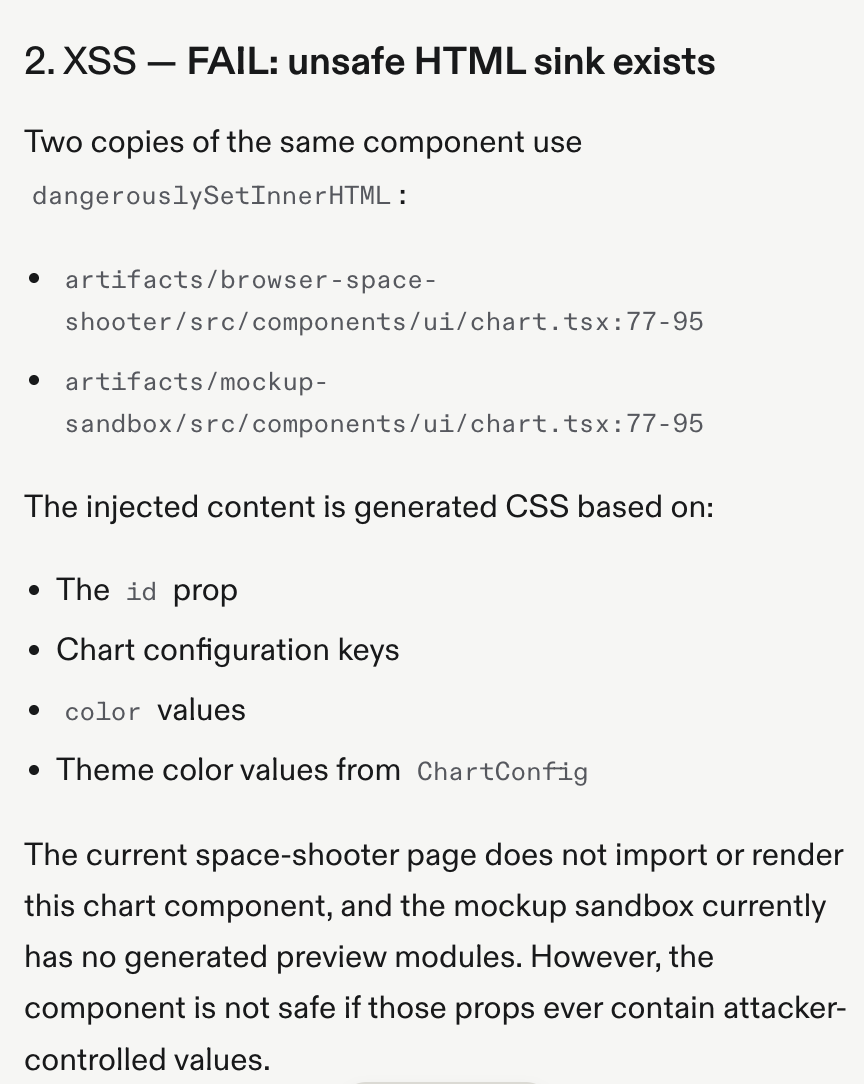
Here's what that looks like in practice — a real audit on Replit flagged an XSS fail:
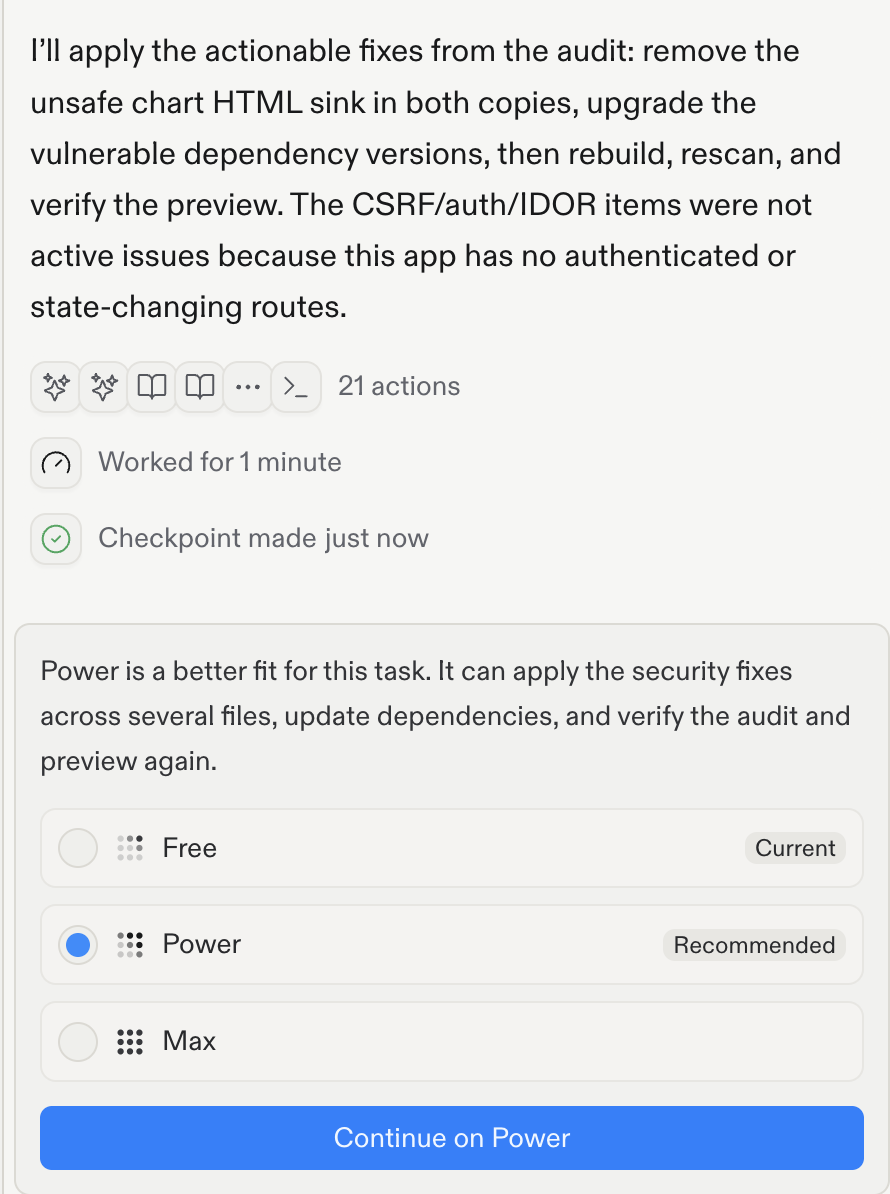
Asking the agent to fix it, it applies the fix and rechecks:
Step 3: Run the audit
- Paste the Step 1 prompt into the same agent session.
- Read every line of the response before doing anything else — don't skim to the bottom.
- For anything marked "fail," ask your agent for the fix, apply it, then re-run just that one check (not the whole prompt) to confirm it's actually fixed.
What you should have when you're done
- A clear pass or fail on all five vulnerabilities from Part 1, for a real project you built — not a hypothetical one
- Every "fail" fixed and re-verified, not just noted
- If everything passed on the first run: that doesn't mean the app is secure, it means this specific pass didn't find anything. Run the manual IDOR test from Part 1 yourself (two accounts, swap the URL) — it catches bugs an AI audit misses.
Add an Automated Review to Your Repo (Claude Code)
Skills are something you run. A GitHub Action is something that runs on its own. If you're using Claude Code, the Claude Code Security Review action reviews every pull request you open and comments on what it finds. Set it up once and it keeps working while you forget about it. This one's Claude Code specific — there's no Replit equivalent.
Trail of Bits Skills
Trail of Bits publishes a free, professionally maintained audit skill pack for Claude Code — insecure-defaults, supply-chain-risk-auditor, differential-review, static-analysis, and building-secure-contracts. Once claude plugin marketplace add trailofbits/skills is working again, it's worth installing. Until then, Step 1's prompt covers the same ground.
What this does not replace
An AI audit finds the common, well-documented bugs. It's very good at the OWASP Top 10 and very bad at logic errors specific to your app, like a payout calculation that rounds the wrong way. It cannot guarantee that every vulnerability is accounted for. If your product handles very sensitive data, consider getting a formal audit.
0/6 correct
0% — get all correct to complete